SYSCAD - CAD for metal construction Start  back  next

XLS 2 elevation

Generating sections > Centre line grid > XLS 2 elevation

Toolbar: SYSCAD Generating sections -> SYSFLY Centre line grid -> Raster strecken


Ribbon: SYSCAD Gener. Sections -> Centre Line Grid -> Raster strecken


The "XLS 2 Grid" command allowskgl_xls2raster_16 window lists to be inserted automatically as auxiliary grids.


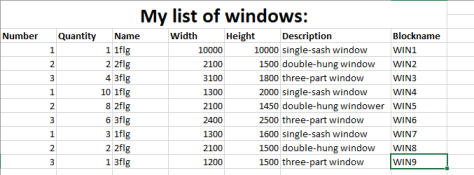
You can use window lists as shown in this example:


fensterliste


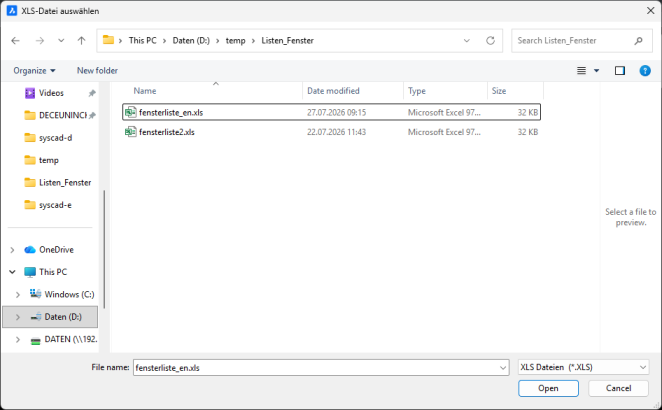
When you run the "XLS 2 Raster" command, you will be asked to select your .xls file.

xlswaehlen


Please note: You must select an .xls file. .xlsx files must be converted.


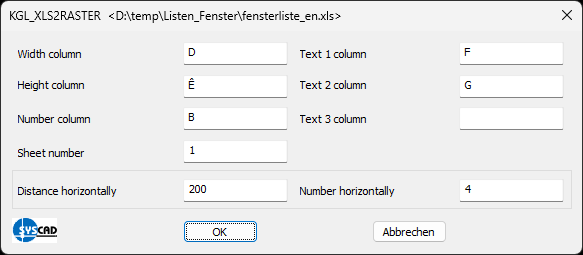
Please then complete the dialogue box:

xls_dialog


Please enter the columns you require from your Excel spreadsheet here.

As shown in the example, ‘Column Width’ corresponds to ‘D’.


You can use ‘Worksheet number’ to select individual worksheets within an .xls file:

tabellenblattnummer

"Horizontal spacing" sets the horizontal distance between the windows in your drawing.

"Number horizontally" sets the number of windows displayed side by side in a horizontal direction.


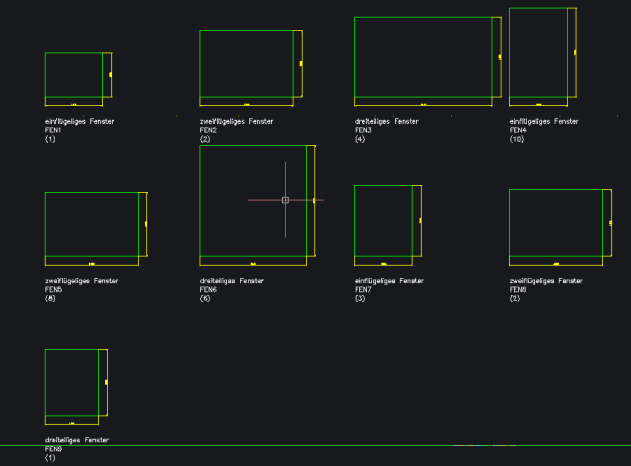
Result shown in the drawing:

raster_fenster